A free Wi-Fi scanning and diagnostics tool for Windows and Android. Discover nearby networks, decode raw beacon frames, track signal history, and generate field-ready PDF reports — built for IT engineers and field technicians.
Everything a field engineer needs to explain "why is this Wi-Fi bad" with evidence, not guesswork.
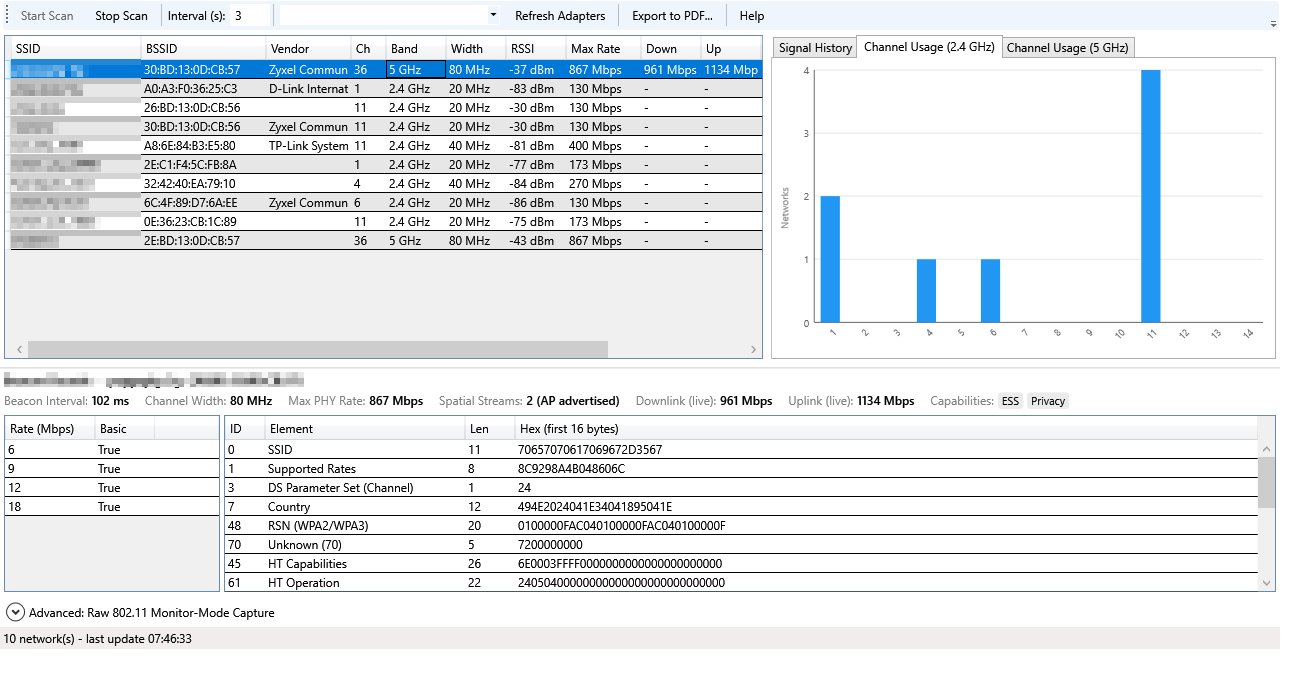
SSID, BSSID, vendor, channel, band, width, RSSI, PHY type, security, and more — refreshed on an adjustable interval.
Full information-element table per access point — ID, length, raw hex, and human-readable decoding of HT/VHT capabilities, RSN cipher/AKM suites, and more.
RSSI-vs-time tracking per access point, plus 2.4GHz/5GHz channel occupancy charts to spot congestion and overlap at a glance.
One-click report with a network summary, per-AP detail pages, decoded beacon tables, host diagnostics, location, ISP, and (Windows) live weather — ready to attach to a ticket. Available on both Windows and Android.
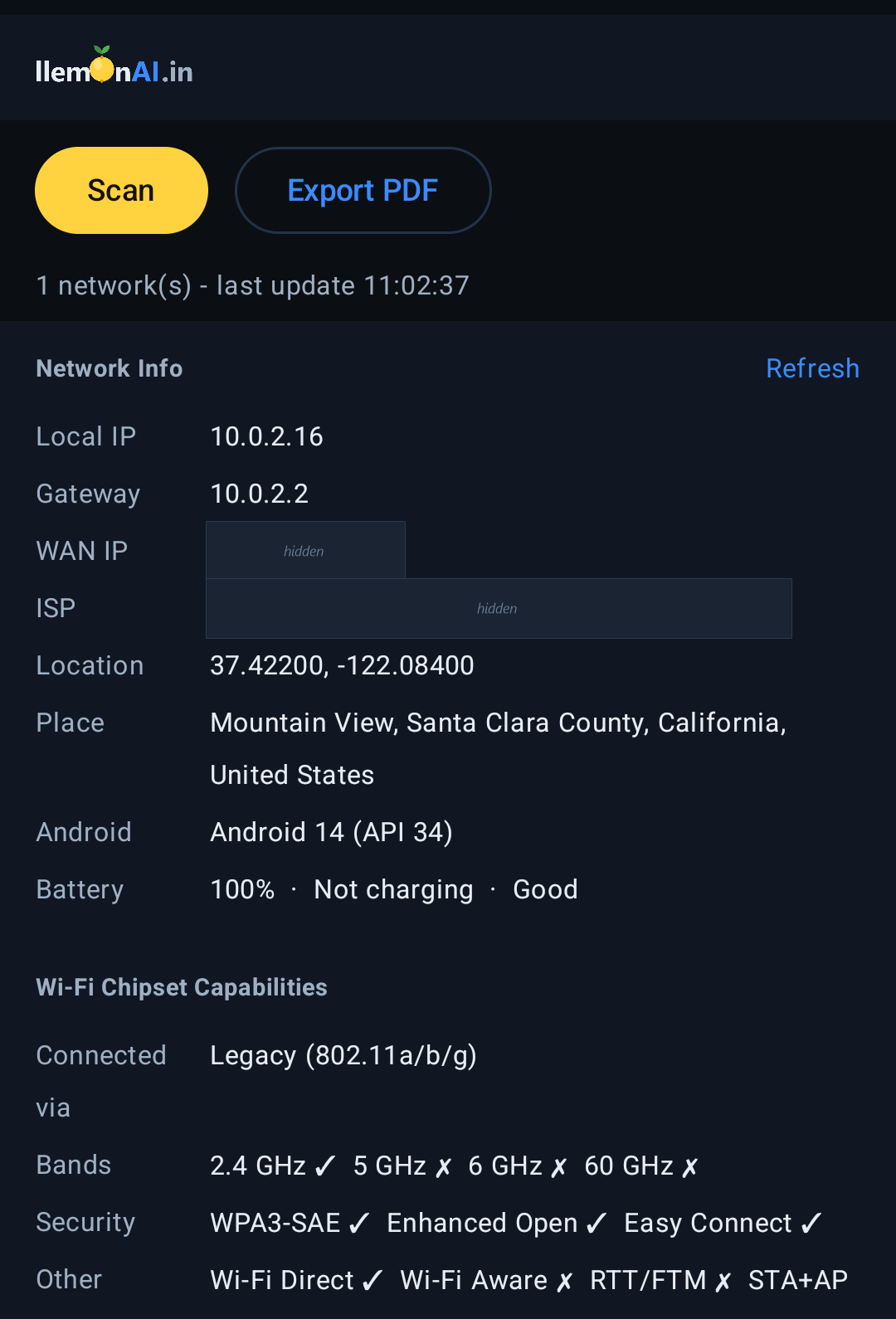
Local IP, gateway, WAN (public) IP, ISP, and GPS location — live, with a Refresh button, on both Windows and Android. Android adds a reverse-geocoded place name too.
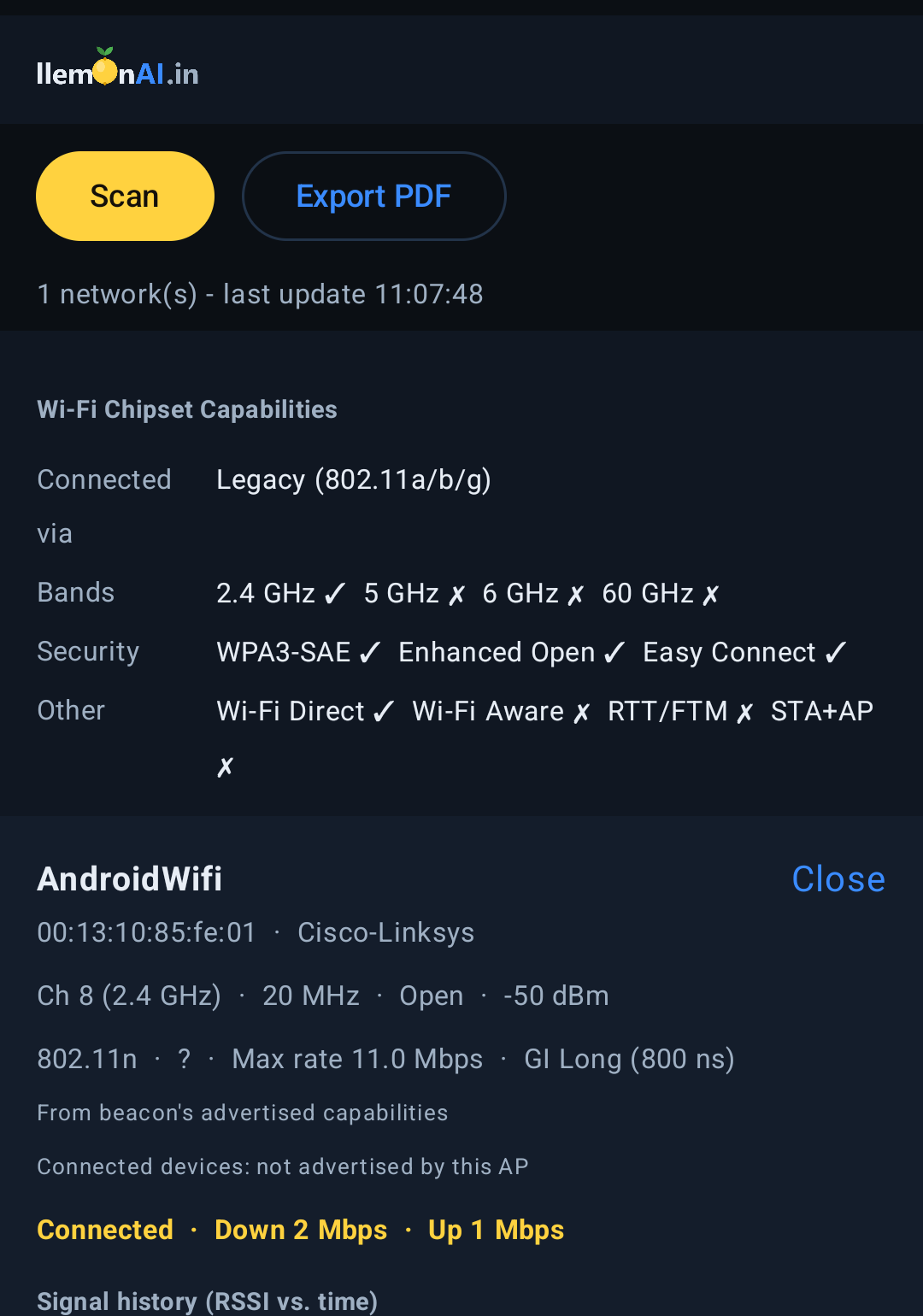
See which Wi-Fi bands and standards your phone's own radio supports — 2.4/5/6/60GHz, WPA3-SAE, Wi-Fi Direct/Aware, and more — plus a real connected-device count per access point where the AP advertises it.
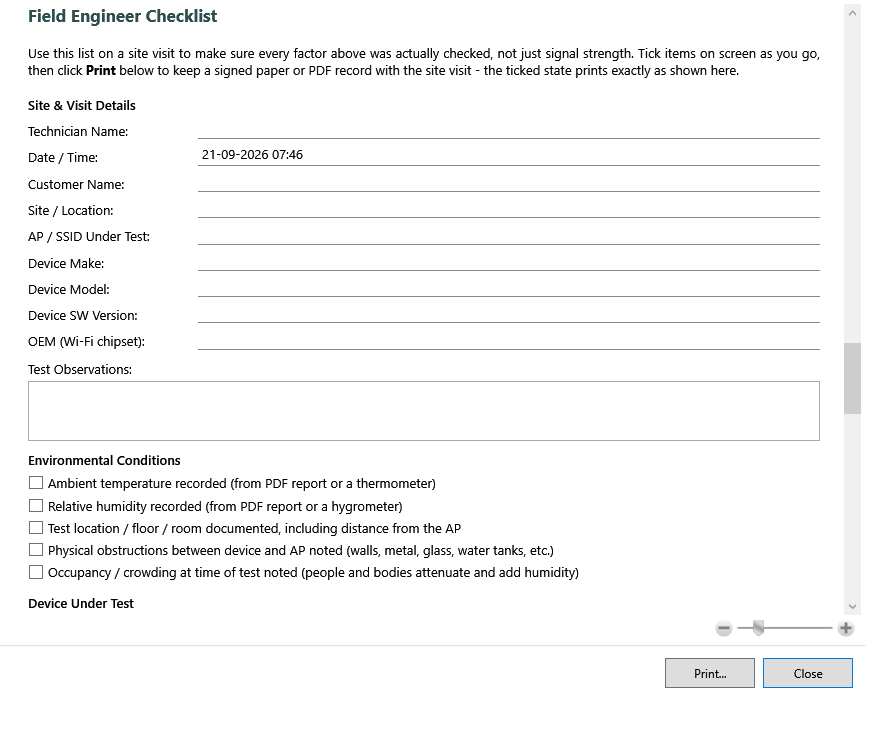
Built-in printable/exportable troubleshooting checklist on both platforms — technician, customer and device details, environmental conditions, RF checks, and throughput verification steps.
Windows: a single self-contained .exe, no installer or admin rights needed — run it from a USB stick. Android: a single sideloaded .apk, no Play Store account needed.
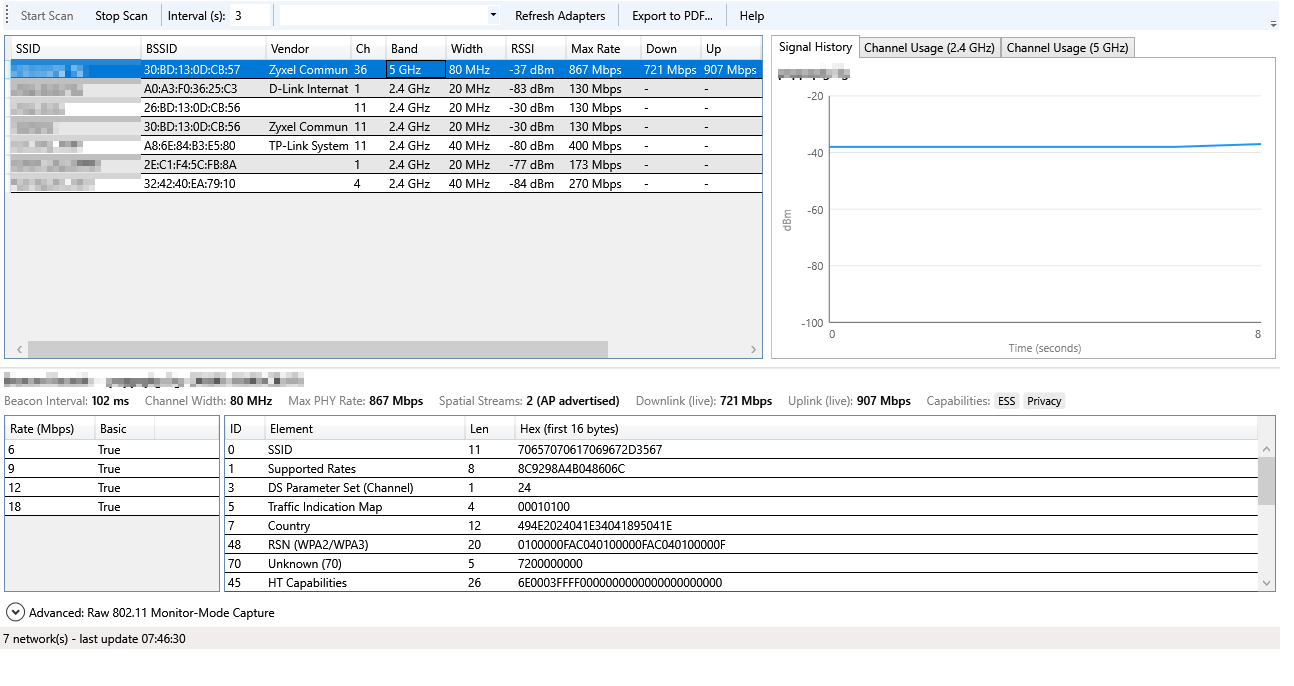
Live network scan with signal history and full beacon decode, plus per-band channel occupancy — on Windows.
...and on Android — same scan/history/channel/checklist views, plus its own Network Info and Wi-Fi Chipset Capabilities cards.
A built-in, printable/exportable checklist — on both Windows and Android — so a site visit covers every factor that affects Wi-Fi performance, not just signal strength. Fill it in on screen, tick items as you verify them, then print (Windows) or share as PDF (Android) a signed record for the ticket.
Windows or Android — pick the build that matches your device. Not sure which Windows build? Almost every PC made since 2010 is 64-bit — use the 64-bit build unless you know otherwise.
New in Windows 15.B4 and Android 15A4, 31 Oct 2026: color-coded Wi-Fi networks based on signal and interference; an M-Lab NDT7 speed test with live results and server selection; local Network Devices discovery (ping-based, limited to a private IPv4 /24, no port scanning); and an AI Companion question progress indicator. Device discovery may miss hosts that block ping; Android may restrict MAC/vendor details.
Older builds stay available if you need them. The latest version above is recommended.
| Version | Released | File | SHA256 |
|---|---|---|---|
| Windows 15.B3 (64-bit) | 23 Sep 2026 | LlemonScanner-15.B3-win-x64.exe | 4267E8A088A1C7590C08372099F0C9FBDB21BF37158AF754BEB5229F83297C7D |
| Windows 15.B3 (32-bit) | 23 Sep 2026 | LlemonScanner-15.B3-win-x86.exe | FF24B74774369853266A4DAC85BDE0C4F0B965FE34ABAE306720AC69B0A7DB61 |
| Android 15A3 | 23 Sep 2026 | llemonai-wifiscanner-15A3-android.apk | B17747E352751EB1A44EEA048DB4613D7EB3B2265E8DF4880676D41FD0EE0BC4 |
| Windows 15.B2 (64-bit) | 22 Sep 2026 | LlemonScanner-15.B2-win-x64.exe | FE29E8F12F15206871B1E073035D1F680DF88D36982AC66D93D3BCE8F51223C8 |
| Windows 15.B2 (32-bit) | 22 Sep 2026 | LlemonScanner-15.B2-win-x86.exe | 4DEDD82509EB1AD2DF962DD7E9A06AF2D862B534F7D60C52E9206CD83C812B40 |
| Android 15A2 | 22 Sep 2026 | llemonai-wifiscanner-15A2-android.apk | 4FB260160717A11C6F7F4AE10E662565407EC6FEC6BFFD08908A417D1ED13C2C |
| Windows 15.B1 (64-bit) | 20 Sep 2026 | LlemonScanner-15.B1-win-x64.exe | A467CBB2198B414DC2B38C93CE0CFF47D2A94A62B2F79EF0B9F849A228A60431 |
| Windows 15.B1 (32-bit) | 20 Sep 2026 | LlemonScanner-15.B1-win-x86.exe | 8A3B84EF335EFE5B91F70317700C41C724DF189B2186A74741B69731832799B3 |
Verify your download hasn't been tampered with or corrupted: after downloading, run certutil -hashfile LlemonScanner-15.B4-win-x64.exe SHA256 (PowerShell/Command Prompt) and compare the result to the SHA256 value shown above for the file you downloaded.
The Windows 15.B4 executables are not digitally signed. Verify each download with its SHA256 checksum above. Android 15A4 is signed with our release key but is not listed on the Play Store, so Android may still warn about installing from an unknown source.
Installing the Android APK: Android will block it by default as an "unknown source." Open the downloaded file, tap through the "Install anyway" / "allow this source" prompt, then Install. This is normal for any app installed outside the Play Store, not a sign of a problem with this app specifically.
Wi-Fi coverage isn't just "signal bars." llemonai WiFi Scanner surfaces the environmental and technical factors that actually determine performance.
| Factor | Why it matters |
|---|---|
| Temperature & humidity | Affects RF propagation and can stress AP/client hardware in enclosed spaces. |
| Device load & connected clients | More clients on a channel means more contention and lower effective throughput per device. |
| Interference | Overlapping channels and non-Wi-Fi RF noise directly reduce usable capacity. |
| Positioning & obstructions | Distance, walls, and line-of-sight change signal strength far more than most people expect. |
| Uplink throughput | A great Wi-Fi signal can't outrun a slow upstream connection — both need to be checked together. |